Car Parking Multiplayer Design Copy Paste Guide (2026)
If you’re bored of driving stock-looking cars in Car Parking Multiplayer while everyone else is flexing clean GTRs, drift builds, and anime liveries, this guide is for you. A lot of players don’t struggle with money or cars; they struggle with design ideas and how to make those designs fast without redoing every single detail on each car.
That’s where Car Parking Multiplayer Design Copy Paste comes in. The game lets you build one solid design, then use copy tools and smart tricks to mirror it, reuse it, and turn your whole garage into a themed collection, drift crew, VIP fleet, race team, whatever you’re into. You don’t need to be a graphic god; you just need to understand the tools, good color combos, and how to avoid messy, overloaded cars.
In this 2026 guide, we’ll break down what the design copy-paste feature actually does, how to use the customization menu properly, and how to build styles like clean street, drift/JDM, racing liveries, anime/Itasha, and VIP luxury builds. You’ll also get copy-paste-friendly ideas, color direction, pro tips for balance and symmetry, plus common mistakes to avoid so your car doesn’t look like a sticker bomb gone wrong.
What “Design Copy Paste” Means in Car Parking Multiplayer
This guide is for players who don’t just want a fast car; they want a good-looking one and don’t want to redesign it from scratch every time. When people search Car Parking Multiplayer Design Copy Paste, they’re really asking two things:
- “Show me ready-made design ideas,” and
- “How do I copy them quickly to other sides/cars?”
Design copy-paste isn’t a magic code; it’s a set of tools inside the game that lets you build one clean design and reuse it smartly across your garage.
Why Players Want Car Parking Multiplayer Design Copy-Paste
Most default cars in CPM look plain, and after a while, every lobby feels like the same five colors on repeat. Players want to:
- Skip ugly stock looks and jump straight to clean, aggressive, or aesthetic builds.
- Match YouTube/TikTok-level designs they see on GTRs, Silvias, and drift builds.
- Keep their whole garage on one theme, maybe a drift crew, JDM collection, race team, or VIP luxury lineup, without manually redoing every vinyl.
Copy-paste is basically your shortcut to a themed, pro-looking garage.
How the Copy-Paste Design Feature Actually Works
In simple terms, you can:
- Copy a design from one side of the car to the other, so your left/right sides match without re-placing every vinyl.
- Use one car as a “reference car” and recreate that same style on another car much faster.
You work this from the same place you always customize:
Garage → Car Upgrade → Exterior → Vinyl/Layers build one solid design there, then use copy tools and small tweaks to spread that style across your other rides.
Basic Customization Menu Where All Designs Start
Before you think about crazy liveries or anime wraps, you need to be comfortable with the customization menu. Every clean Car Parking Multiplayer Design build starts in the same place: the garage.
Opening the Garage and Customization Menu
Garage → Car Upgrade → Exterior:
From the main screen, tap Garage, pick your car, then hit Car Upgrade → Exterior. This is your main workshop: colors, vinyl, body parts, rims, lights, everything visual starts here.
Best car types to start learning designs on (simple body shapes)
If you’re still learning, don’t start with a super curvy or over-detailed car. Go with something with simple body lines like a GTR, Silvia-style coupe, or a basic sedan. Flat panels make it easier to place vinyl shapes and see how your design flows from front to back.
Main Areas You Can Customize
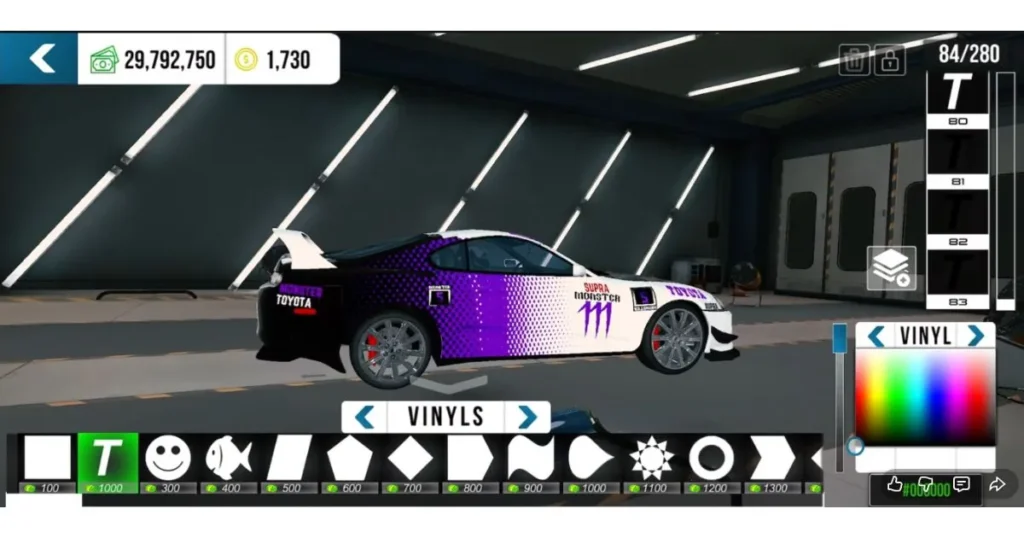
Vinyl & Decals (shapes, logos, anime, stripes)
This is where you add stripes, logos, anime/Itasha art, race numbers, and sponsor-style text. You’ll be working with layers, scaling, rotating, and later using copy tools to mirror them.
Body Parts (spoilers, wide body kits, bumpers, skirts)
Here, you bolt on wide body kits, big wings, front lips, side skirts, and turn a boring street car into a drift or race monster. The shape you choose affects how good your vinyl layout looks.
Wheels & Tires (rims, tire color, stance look)
Rims and tire color can make or break a build. Match them to your main color theme, and think about stance, sporty wheels + slightly lowered suspension instantly level up the design.
Plates, Flags, and Police/Storable Lights
Small details: custom plates, country flags, storable lights, and police lights. Use them to add personality, not chaos.
Interior & Logo Details (if you want to go deep)
If you like full builds, tweak interior colors, ambient/starlight, steering, and logos. These don’t always show in photos, but they complete the vibe when you’re cruising in cockpit view.
How to Use Copy Paste Design Step-by-Step (Clean Version)
If you want the Car Parking Multiplayer design to copy and paste to actually work for you, treat it like a tool, not magic. The goal is simple: design once, reuse smartly, and keep everything looking clean.
Copying a Design from One Side of the Car to the Other
First, pick the car you’re working on and go to Garage → Car Upgrade → Exterior → Vinyl.
- Build your design on one side only, stripes, shapes, anime, text, whatever you’re going for.
- Once that side looks good, use the copy/mirror option (depending on your layout) to send that design to the other side.
This does two things for you:
- Saves a ton of time compared to placing every shape twice.
- Keeps both sides perfectly aligned, so your car looks intentional, not slapped together.
Copying a Design from One Car to Another as a Reference
Think of one build as your reference car, the “main” design for your crew or garage.
- First, finish that reference car with your chosen colors, vinyl layout, body kit, and wheels.
- Then, grab another car and recreate the same layout: same base color, similar vinyl placement, matching rims, and stance.
You’ll end up with different models, GTR, Silvia, Mustang, Supra, all rocking the same team style, like a drift squad or race team.
Common Mistakes When Using Copy and Paste (And How to Avoid Them)
Copying messy designs and duplicating the chaos: If the first car is overloaded with random stickers, copy-paste just spreads the mess. Keep the base design clean before you clone it.
Forgetting to adjust the vinyl scale for different car shapes: A shape that fits a coupe might look weird on an SUV or hatchback. After copying, always tweak the size and position so it matches the new body.
Overusing stickers so the car looks noisy, not clean: Copy-paste tempts you to keep adding more. Limit yourself to a few main shapes and logos. Less noise = more “pro” look.
Ready-to-Use Car Parking Multiplayer Design Ideas (Copy-Paste Friendly)
We’re not just talking colors here; these are full styles you can actually build, then use Car Parking Multiplayer design copy and paste to save them to the other side and reuse them on your other cars. Treat these as “recipes”: build once, tweak a bit, then clone across your garage.
Clean Street Builds (Daily / OEM+ Vibes)
Nissan GTR “Black & Orange Clean Street”
Start with a dark base (black/charcoal) on your GTR, then add a few sharp orange shapes along the sides using vinyl, one main stripe, one smaller accent, nothing crazy. Copy the design to the other side, then reuse the same style on cars like the Mustang or Supra to keep a clean street theme.
Simple 2–3 Color Combos That Always Work
If you’re lost, stick to:
- Black + white,
- White + gold,
- Grey + red.
One main body color, one accent, max one extra detail color. Copy this pattern onto your other cars so the whole garage looks like one crew instead of random builds.
Drift & JDM Style Builds
BMW M3 / E36 Drift Setup (Lowered, Stripes, Bold Colors)
Drop the car a bit, pick a bright main color (red, yellow, or blue), then add angled vinyl stripes along the side and hood. Sporty rims, a wide kit, and some text near the rear quarter panel finish it. Copy the pattern to your other drift cars and adjust colors slightly.
Silvia / 240Z / Supra JDM Look (White Base, Black Shapes)
Go white base, then black vinyl shapes along the bottom of the doors and rear quarter, maybe a small logo or Japanese-style text. Minimal text, no sticker spam. Copy-paste this layout to other JDM-type cars and just swap accent colors if you want.
Full Racing / Track Liveries
McLaren 720S / Renault Megane R.S. Race-Style Designs: Use a bright main color (orange, blue, or yellow), then layer darker shapes and white blocks for that race-car feel. Add a big number on the door and a few “fake sponsor” texts. Copy the structure to different models so your whole team looks like it came from the same championship.
Using Vinyl Layers for Racing Stripes, Logos, and Numbers
Think in layers:
- Base color.
- Long racing stripe from hood to trunk.
- Side blocks and numbers.
- Small logos last.
- One side is done, copy it across, then reuse the same layout on a second car.
Anime / Itasha Inspired Designs
Basic Anime Layout (One Side Character, One Side Clean): Pick one side of the car for the character/art, the other side mostly clean with a logo or simple text. Use softer background shapes so the character stands out. Copy the clean side across other cars to keep the theme, and only change the main art on your “hero” car.
How to Avoid Making It Look Cluttered or Unreadable: Don’t cover every inch in stickers. Leave some body color visible, keep text to 1–2 spots, and avoid using five different fonts. After you copy the design, step back in free roam and check if you can actually read what’s on the car.
VIP & Luxury Builds
Black, Pearl White, Grey, Gold Accents: VIP style is all about calm colors: deep black, pearl white, dark grey, with small gold or chrome accents. Use simple thin lines, maybe a badge or logo, and drop the car slightly on clean rims.
Simple, Clean Design for VIP Cars: No anime, no big stripes, no huge logos. One main color, one accent line, good stance. Build one VIP car you like, then use copy-paste and small tweaks to turn your whole luxury garage into a matching VIP fleet.
Color Codes and Styling Basics for CPM Designs
Once you understand shapes and copy tools, colors decide whether your Car Parking Multiplayer design copy-paste build looks clean or cheap. You don’t need 10 shades; you just need a few reliable combos.
Reliable Color Palettes That Always Look Good
Dark base + bright accent (black/orange, black/red, navy/yellow)
Dark base, bright accent is the safest combo in this game.
- Black + orange
- Black + red
- Navy + yellow
Works great on GTRs, Mustangs, BRZ, anything aggressive. Keep the body dark, then use vinyl for bright stripes and shapes.
Light base + dark accents (white/black, white/gold)
For cleaner or VIP builds, flip it:
- White + black
- White + gold
Make the car feel more premium. This is perfect for luxury sedans, BMWs, or VIP-style coupes.
Using Color Codes and Car Parking Multiplayer Color Guides
How to use hex-style color ideas even if the game doesn’t show real hex: Most guides give colors in HEX style, like #424242 or #E18116. CPM doesn’t show hex directly, but you can still copy the tone: dark grey, bright orange, pearl white, etc. Use those codes as inspiration, not exact values.
If you want more combos, full palettes, and examples, check the Complete Car Parking Multiplayer color code guide and link it from here so players can dive deeper into colors.
Matching Wheels, Lights, and Body Kits with Your Design
Rim color and style to match body: Rims should follow your theme: black/white rims for simple builds, silver/chrome for VIP, bright accent rims for drift cars.
Light color (storable/police) that fits the theme: Match storable lights and police lights with your design, blue/white for race builds, warm tones for VIP, crazy colors for anime builds.
Wide body + stance for aggressive builds: For race and drift vibes, add a wide body kit, drop the suspension a bit, and keep wheel fitment tight. Then use copy-paste designs across your other cars so your whole garage carries the same aggressive stance.
Pro Tips for Creating Better Designs Before You Copy and Paste
If the base design is bad, the Car Parking Multiplayer design copy-paste just spreads the disaster to every car you own. The trick is to make one clean, solid look first, then duplicate it.
Start Simple, Then Layer Up
Don’t open the vinyl menu and spam 20 stickers on your car. Start with:
- One base color
- One or two main shapes or stripes
Drive it a bit, look at it in daylight and at night, then add small details if it still feels empty. Simple builds always look more “pro” than a cluttered mess of random logos.
Symmetry and Balance with the Copy Tool
- Use copy-paste to mirror, then tweak small details by hand
- Build your layout on one side, copy it to the other, and then adjust tiny things: move a logo, change one stripe, maybe flip a shape. That keeps the car balanced but not boring.
- Why can both identical sides look “too perfect”
- When both sides are 100% mirrored, the car can look like a toy skin, not a real build. Small differences like a number on one side, text on the other make it feel more natural and less copy-paste spam.
Combining Design and Performance Vibes
- Drift look: low stance, clean lines, bold stripes
Lower the car, use strong colors (red, yellow, purple), and a few angled stripes. Keep the design aggressive but not overloaded.
- Race look: sponsor logos, numbers, contrasting colors
- Bright base color, high-contrast shapes, door numbers, and a few fake sponsors. Looks sick in lobbies and screenshots.
- VIP look: subtle colors, chrome/gloss, less is more
- Black, pearl white, or grey with tiny gold or chrome accents. No anime, no big logos, just clean stance, nice rims, and smooth paint.
Using Copy-Paste Design on Different Devices (Mobile, PC, Emulator)
You can build and copy your CPM Android Mobile Game Apk design on almost any phone, tablet, or PC with an emulator. The tools are the same, but each device is better for different parts of the process.
Designing on Mobile (Phone/Tablet)
On iOS or Android, mobile is best for quick edits and simple designs. Touch controls make it easy to tap, drag, zoom, and rotate vinyls, and you can test your design instantly in free roam. For basic stripes, color changes, and light tweaks, a phone or tablet is more than enough.
Designing on PC with an Android Emulator
1. Emulators (BlueStacks, LDPlayer, etc.)
If you want more precise control, run CPM on PC using an emulator like BlueStacks, LDPlayer, Nox, or similar.
2. Bigger screen = easier vinyl placement and precise alignment
A larger monitor makes lining up vinyl layers, stripes, and logos way easier. You see the whole car clearly, place shapes more accurately, and then you can copy-paste that design to other sides/cars without fighting tiny touch targets.
Syncing Styles Across Your Garage
Once you’ve built one master design, use copy-paste and smart tweaks to spread it across your whole lineup:
- Build the design on your main car
- Recreate it on other models with the same colors and layout
- Adjust the scale and position so it fits each body shape
That’s how you turn a random collection of cars into a matching crew, not just a parking lot of unrelated skins.
Common Design & Copy Paste Mistakes (And How to Fix Them)
Copy tools are powerful, but if you’re not careful, Car Parking Multiplayer design copy paste just multiplies your mistakes. Here’s what usually goes wrong and how to fix it.
Overloaded Cars (Too Many Decals, Colors, Parts)
If your car looks like a rolling sticker shop, strip it back:
- Remove extra vinyl layers until you’re down to 1 base color + 1–2 accent shapes.
- Pick a maximum of three colors total (body + 1–2 accents).
- Delete random logos that don’t match the theme.
Once the car looks clean, then you copy that refined version to your other rides.
Designs That Look Good in Garage but Bad in Free Roam
Garage lighting lies. A design can look sharp in the menu and completely off on the street. Always:
- Take the car outside in daytime and nighttime.
- Check it from the front, side, rear, and distance.
If colors clash or shapes disappear at a distance, adjust them before saving or copying to your other cars.
Copying a Design onto the Wrong Type of Car
Not every livery fits every shape. A sleek race design made for a McLaren or GTR will look weird on a boxy SUV or bulky muscle car.
To adapt it:
- Keep the color palette and main idea, but move or resize vinyls to match the new body lines.
- On thicker cars, use bigger, simpler shapes instead of tiny details.
Same theme, same vibe, just reshaped so it fits.
Advantages of Using Design Copy-Paste in CPM
When you use Car Parking Multiplayer design copy and paste properly, it’s not just a “lazy shortcut”, it’s how you make your whole account look organized and pro.
Build a Themed Garage Fast
Instead of every car having a random look, you can build one clean style and spread it across your whole lineup. Same colors, same vibe, different models. In a few minutes, you’ve got a proper drift crew, race team, or VIP fleet, not a chaos collection.
Stand Out in Multiplayer Lobbies
Most players rock one decent car and nine half-finished ones. When you pull up with multiple cars sharing one theme, it instantly looks intentional. People notice matching designs and start asking, “You, how’d you do that?” That’s how you get attention and friends without typing a word.
Save Time for Driving, Not Redoing Vinyl Every Time
Once you’ve dialed in a design, copy-paste means you’re not rebuilding it from zero on every car. Less time in menus, more time racing, drifting, cruising, or roleplaying the stuff you actually opened the game for.
Frequently Asked Questions
How Do I Copy and Paste a Design from One Side of the Car to the Other?
Build your vinyl layout on one side first in Garage → Car Upgrade → Exterior → Vinyl. When it looks good, use the mirror/copy option to send that layout to the other side so both sides match instantly.
Can I Copy a Design from One Car Model to a Different Car?
Not with a one-click magic button, but you can use one car as a reference and manually recreate the same colors, stripes, and logos on another car. It’s still faster because you already know the layout and style you’re aiming for.
Why Does My Design Look Different on Another Car After Copying?
Because every car has different body lines and panel shapes. A stripe that fits a coupe might look stretched or bent on an SUV, so after copying the idea, you still need to resize and reposition the vinyls to match the new car.
How Many Vinyl Layers Should I Use for Clean Designs?
For most builds, start with 3 to 7 layers: base shapes, one or two accents, then small logos or text. If you’re in double digits and everything looks noisy, you’ve probably gone too far.
What’s the Best Style for Beginners: Drift, Clean, or Racing?
Start with clean street builds: simple colors, light stripes, no crazy logos. Once you’re comfortable, move into drift and racing styles where you add bolder colors, numbers, and more aggressive layouts.
Final Thoughts
The whole point of Car Parking Multiplayer design copy-paste is simple: learn the basics, make one good design, then let copy-paste do the heavy lifting. You don’t need ten different liveries if you can build one clean style and spread it across your GTR, Silvia, Mustang, Supra, whatever you drive.
Use the ideas in this guide as starting points, not strict rules. Take a clean street build, drift style, racing livery, or VIP setup, then tweak colors, stance, and vinyl placement until it feels like your brand. Design once, copy smart, and flex a garage that actually looks like it belongs to the same driver.